Yet implementation isn't without challenges. Choosing compatible hardware and software, training staff effectively, and ensuring barcode durability in harsh environments like industrial laundries where moisture, heat, and chemicals are constant factors can complicate even well-planned rollouts.
This guide explains how to select, implement, and operate a barcode inventory system in real-world conditions, moving beyond theory to address the practical considerations that determine success or failure in operational environments.
TLDR
- Barcode systems combine scannable codes, scanning hardware, and software to track inventory in real time with 99%+ accuracy
- Implementation requires compatible scanners/printers, integrated software, standardized barcodes, and staff training
- Benefits include 90% error reduction, 60-75% faster counts, and real-time visibility
- Use 2D barcodes (QR, Data Matrix) for harsh environments and thermal transfer printing for durability
- ERP or WMS integration maximizes ROI through seamless data flow
For any questions reach out to 9119212121
What Is a Barcode Inventory System?
A barcode inventory system is a technology solution that uses scannable barcodes, scanning devices, and software to track and manage inventory throughout its lifecycle.
The system transforms physical items into digital records that can be instantly retrieved, updated, and analyzed.
Barcodes function as unique identifiers containing encoded information—product names, SKU numbers, locations, quantities, and specifications.
When scanned, this data is immediately transmitted to inventory management software, eliminating manual data entry and the errors that come with it.
Understanding Barcode Types:
- 1D Barcodes (Linear): Traditional vertical lines encoding limited data, typically 48 characters maximum. UPC codes and GS1-128 fall into this category. They're simple, widely supported, but constrained by data capacity.
- 2D Barcodes (Matrix): QR codes and Data Matrix symbols encode data on both x and y axes, storing thousands of characters. They can be read from any direction and include error correction, making them more resilient to damage.
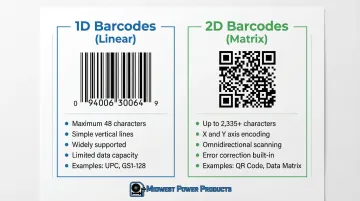
According to the GS1 barcode standards, 2D symbologies like Data Matrix can hold 2,335 alphanumeric characters compared to GS1-128's 48-character limit, enabling storage of serial numbers, expiration dates, and batch information in a single scan.
Real-Time Inventory Visibility
Beyond the technical specifications, these systems provide real-time visibility into stock levels, location, and movement across facilities. Whether tracking products through a retail supply chain or managing thousands of garments through industrial laundry wash cycles, barcode systems create an auditable trail of every item's journey.
Key Components of a Barcode Inventory System
Barcodes (Labels and Symbology)
Barcodes are printed labels affixed to items, containing encoded data in a specific symbology. The symbology you choose—Code 39, Code 128, QR Code, Data Matrix—depends on three factors: data requirements, scanning environment, and industry standards.
Industrial environments demand durability. Labels must withstand moisture, heat, abrasion, and chemicals.
According to ISO 15797 standards for industrial laundering, textiles undergo extreme conditions that standard paper labels cannot survive. In these cases, polyester or polyimide labels with thermal transfer printing become essential.
Once you understand your durability requirements, you'll need to decide how to generate your barcodes.
Barcode Generation Options:
- Generate in-house using barcode software for internal SKU tracking
- Purchase GS1-registered codes for global supply chain recognition
- Use industry-specific symbologies (Data Matrix for healthcare, GS1-128 for logistics)
Scanning Hardware
Scanner selection depends on scan volume, mobility needs, and environmental conditions. The barcode scanner market shows handheld devices commanding 81.9% market share, driven by warehouse and manufacturing mobility requirements.
Scanner Types and Applications:
| Scanner Type | Key Features | Best Use Case |
|---|---|---|
| Handheld Laser | Fast, long-range, durable | High-volume 1D warehouse tasks |
| 2D Imager | Reads 1D/2D, damaged codes, screens | Logistics, healthcare, manufacturing |
| Fixed Industrial | Automated, high throughput | Conveyors, production lines |
| Smartphone/Tablet | Cost-effective, flexible | Small operations, mobile picking |
| Wearable | Hands-free operation | Warehouse picking operations |
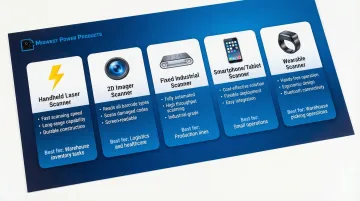
Beyond basic scanner types, environmental conditions dictate specific hardware requirements. For harsh environments, rugged scanners with IP65/IP67 ratings and 8-foot drop specifications are non-negotiable. The Zebra DS3678-ER scanner exemplifies industrial-grade hardware, operating from -22°F to 122°F with complete dust and waterproof sealing.
Inventory Management Software
Software is the central hub storing, organizing, and interpreting barcode data. It provides dashboards, reports, and real-time inventory updates that transform raw scan data into actionable intelligence.
Critical Software Features:
- Real-time stock updates across multiple locations
- Location tracking and bin management
- Low-stock alerts and reorder automation
- Audit trails for compliance and troubleshooting
- Integration APIs for ERP and WMS systems
Integration with existing business systems—ERP, WMS, accounting software—is essential. Without it, you create data silos that require manual reconciliation, defeating the purpose of automation.
According to VDC Research commissioned by GS1 US, 43% of companies lack proper change management plans, and 70% experience weekly readability issues due to poor integration and quality control.
Label Printers
Barcode label printers generate durable, scannable labels in-house. The choice between direct thermal and thermal transfer printing has significant durability implications.
Printing Technology Comparison:
- Direct Thermal: Uses heat-sensitive media, no ribbon required. Labels fade with heat, light, and time. Best for short-term shipping labels (3-6 months).
- Thermal Transfer: Uses heated ribbon to melt ink onto label material. Produces durable images resistant to heat, moisture, and chemicals. Essential for permanent identification and outdoor use.
According to Zebra's printing technology guide, thermal transfer is required for asset tags, outdoor applications, and any label needing to survive more than six months.
Integration with Existing Systems
Seamless integration with existing business systems maximizes value. When items are scanned, inventory records, purchase orders, sales orders, and financial systems should update automatically without manual intervention.
Integration Standards:
- APIs and SDKs: Programmatic control over scanners and data flow
- EDI Standards: ANSI X12 EDI 856 for shipping notices and inventory synchronization
- GS1 Syntax: Parsing Application Identifiers (AIs) to extract GTIN, batch/lot, and expiry data from single scans
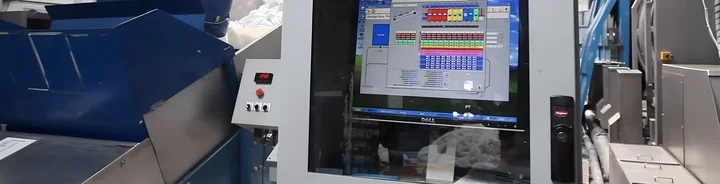
For industrial laundries, systems like Softrol's LOIS (Laundry Operation Information System) integrate barcode scanning with automated sorting and wash aisle controls, creating end-to-end visibility across the entire plant operation.
How to Implement a Barcode Inventory System (Step-by-Step)
Successful implementation follows a structured sequence: assess needs, select hardware/software, generate barcodes, label inventory, train staff, test, and go live. According to inventory system ROI data, businesses that follow this methodology achieve payback periods of 6-12 months.
Step 1: Assess Your Inventory and Operational Needs
Identify what inventory requires tracking: raw materials, finished goods, equipment, tools, or garments.
Determine data requirements—SKU, location, quantity, serial numbers, batch codes, expiration dates.
Map workflows where barcode scanning adds value:
- Receiving: Intake verification and inventory addition
- Putaway: Location assignment and tracking
- Picking: Order fulfillment and stock reduction
- Cycle Counting: Regular accuracy audits
- Shipping: Order verification and inventory deduction
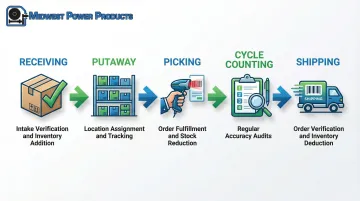
In industrial laundries, according to commercial laundry challenge data, 49% of facilities report significant inventory loss issues, making tracking through wash cycles, sorting, and delivery critical.
Step 2: Choose Compatible Hardware and Software
Select scanners and printers matching your environment and volume needs.
Consumer-grade devices fail in industrial settings—VDC Research TCO analysis shows consumer devices cost $3,895/year in total ownership costs compared to lower costs for rugged devices, despite higher upfront prices, due to consumer device failure rates.
Hardware Selection Criteria:
- Environment: IP ratings for moisture, temperature range for heat exposure
- Volume: Scans per day, throughput requirements
- Mobility: Wireless vs. tethered, hands-free vs. handheld
- Symbology Support: 1D-only vs. 2D imaging capability
Choose inventory software that integrates with existing systems and supports your chosen symbologies. Start with a pilot test using limited devices before full rollout to validate compatibility and workflow fit.
Once hardware is selected, the next critical decision is which barcode format best fits your data and environmental requirements.
Step 3: Select Barcode Symbology and Generate Barcodes
Choose barcode type based on data requirements and environment. For simple SKU tracking with stable conditions, 1D barcodes suffice. For harsh environments or when encoding serial numbers, batch codes, and expiration dates, 2D symbologies are superior.
According to ISO/IEC barcode standards, Data Matrix and QR codes include error correction algorithms that maintain readability even when partially damaged—critical for industrial laundry applications where labels endure repeated wash cycles.
Symbology Selection Guide:
| Symbology | Max Capacity | Standard | Best For |
|---|---|---|---|
| GS1-128 | 48 characters | ISO/IEC 15417 | Pallets, cartons, logistics |
| QR Code | 4,296 characters | ISO/IEC 18004 | Marketing, extended data |
| Data Matrix | 2,335 characters | ISO/IEC 16022 | Healthcare, small components, harsh environments |
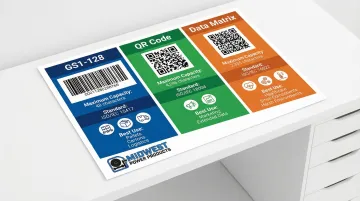
Generate barcodes using software tools or online generators. Decide whether to use internal codes or purchase GS1-registered barcodes for retail and supply chain applications requiring global recognition.
Step 4: Print and Apply Barcode Labels to Inventory
Print durable labels that withstand your operational environment.
For industrial laundries, this means moisture-resistant, heat-resistant materials that survive wash temperatures up to 160°F and chemical exposure.
Label Material Selection:
- Paper: Indoor retail, short-term shipping (3-6 months)
- Polypropylene: Shelf marking, moderate moisture resistance
- Polyester: Asset tracking, outdoor use, industrial environments
- Polyimide: Extreme heat applications like circuit board manufacturing
According to UL 969 labeling standards, labels must adhere permanently and remain legible under environmental stress. Test label materials in real-world conditions before full deployment.
Label items consistently in the same location for easy scanning. Create a labeling standard document specifying label size, placement, and format for new inventory.
With labels applied and systems configured, success depends on proper user adoption and training.
Step 5: Train Your Staff on Scanning Procedures
Hands-on training for all users is essential—VDC Research found 43% of companies lack change management plans, contributing to implementation failures.
Training Components:
- How to properly scan barcodes (distance, angle, lighting)
- Interpreting software data and alerts
- Troubleshooting common scanning issues (damaged labels, connectivity)
- Proper handling of scanning equipment
Create quick-reference guides and establish ongoing support resources to reinforce proper procedures. Schedule refresher training quarterly and whenever new staff join.
Step 6: Test the System Before Full Deployment
Conduct a pilot test with a subset of inventory and users. Track key performance indicators:
- Pick accuracy percentage: Target 99%+
- Lines picked per hour: Measure productivity gains
- Cycle count variance: Compare physical counts to system records
According to case study data from Mann & Noble, barcode implementation improved stock accuracy by 40%. Identify issues with scanning accuracy, software integration, or workflow gaps during the pilot phase.
Refine processes based on feedback before company-wide rollout. A successful pilot builds confidence and identifies hidden costs or technical challenges early.
Best Practices for Barcode Inventory Systems
Standardize Barcode Formats and Placement
Use consistent symbologies and label placement across all inventory. Variation creates scanning errors and slows operations. GS1 label placement guidelines specify that pallet symbols should be placed 400-800mm from the base and at least 50mm from vertical edges.
Standardization Requirements:
- Document label size, format, and location in a company style guide
- Use the same symbology for similar item types
- Maintain adequate quiet zones (white space) around barcodes
- Orient barcodes perpendicular to curved surfaces to prevent distortion
Maintain Equipment and Update Software Regularly
Regular maintenance prevents readability issues that slow operations and create errors. Clean scanner lenses monthly, replace worn printer components, and keep software updated with security patches and new features.
Industrial scanners like the Honeywell Granit series have MTBF (Mean Time Between Failures) ratings exceeding 80,000 hours, but only with proper maintenance.
Schedule quarterly system audits to ensure hardware and software perform optimally.
Ensure Barcode Durability for Your Environment
Your barcode labels need to withstand the specific conditions of your operation. Industrial laundries present particularly demanding environments—processing thousands of garments through 160°F wash cycles with harsh chemicals means standard paper labels fail immediately.
Durability Testing Protocol:
- Test label materials and adhesives in real-world conditions
- Run sample labels through complete wash/processing cycles
- Verify scannability after exposure to heat, moisture, and chemicals
- Use laminated or synthetic labels for harsh environments
ISO 15797 textile washing standards document the extreme conditions industrial workwear undergoes. For textile services operations, polyester or polyimide substrates with thermal transfer printing provide the durability needed to maintain tracking accuracy through hundreds of processing cycles.
How Barcode Systems Work in Industrial Laundries
Industrial laundries and textile services face unique challenges in tracking thousands of garments, linens, and uniforms through washing, sorting, and delivery cycles. The goal: minimize loss while maintaining fast turnaround times.
Barcode systems enable real-time tracking from intake through wash cycles, sorting, and delivery. Each garment receives a barcode or RFID tag containing its unique identifier, customer assignment, and processing history.
As items move through the facility, scanners strategically positioned at each checkpoint capture location and status data automatically.
Industrial Laundry Workflow Integration:
- Receiving: Scan incoming garments to verify quantities and assign to customer accounts
- Soil Sorting: Track contamination levels and route to appropriate wash formulas
- Wash Aisle: Monitor items through wash cycles with automated material handling
- Clean Sorting: Automated sortation systems process up to 3,800 garments per hour
- Delivery: Build delivery carts and create manifests based on scan data
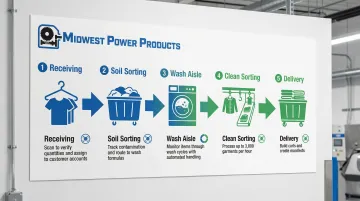
These workflow steps become even more powerful when integrated into a unified management system.
Advanced plant management systems like Softrol's LOIS integrate barcode scanning with automated sorting and wash aisle controls. Customer implementations demonstrate significant operational gains: facilities have achieved up to 77% reduction in sorting labor while processing 3,500 garments per hour, with labor savings equivalent to 18 full-time employees.
The system provides end-to-end visibility across the entire plant operation. Managers receive real-time alerts via email and can monitor operations 24/7 from smartphones and tablets. This level of integration reduces garment loss, improves turnaround times, and provides the traceability data needed for customer billing and quality assurance.
Conclusion
Implementing a barcode inventory system succeeds through structured processes and consistent scanning discipline. The technology is mature, standards are established, and benefits are quantifiable.
ROI comes from three primary areas:
- Error reduction: Studies show up to 90% fewer inventory errors compared to manual tracking
- Speed improvements: Research indicates 60-75% time savings on inventory counts and cycle counts
- Real-time visibility: Instant data access supports better purchasing and allocation decisions
According to industry research, most businesses achieve full payback within 6-12 months through labor savings and accuracy improvements alone.
Start small with a pilot program covering a specific product line or warehouse zone. Refine your processes based on real-world feedback, then scale up as you gain confidence and see results.
Success requires three commitments: standardizing your labeling and scanning procedures, investing in thorough staff training, and selecting hardware and labels matched to your operational environment—whether that's freezer storage, outdoor yards, or high-humidity wash areas.
Frequently Asked Questions
How do you manage inventory with a barcode scanner?
Scan items during receiving, putaway, picking, and shipping to automatically update inventory records in real time. This eliminates manual data entry and significantly reduces errors compared to manual tracking methods.
How much does an inventory management system with a barcode scanner cost?
Entry-level setups with basic scanners run $1,500-$3,000, mid-range cordless systems cost $5,000-$15,000, and rugged enterprise deployments exceed $50,000 depending on scale and integration needs.
What are the best inventory management systems with barcode scanners?
The best system depends on your industry and operational needs. For industrial laundries, specialized systems like Softrol's LOIS provide wash aisle integration and automated sorting features that general-purpose systems lack.
What types of barcodes work best for industrial environments?
2D barcodes like QR codes and Data Matrix work best because they include error correction and remain readable when damaged. Pair them with durable polyester labels and thermal transfer printing for moisture, heat, and chemical resistance.
Can barcode systems integrate with existing plant management software?
Yes, most modern systems integrate with ERP, WMS, and plant management software via APIs or database connections, enabling seamless data flow and automatic inventory updates.
How do you handle barcode scanning in harsh environments like industrial laundries?
Use ruggedized IP65/IP67-rated scanners with -22°F to 122°F operating ranges, durable polyester or polyimide labels with thermal transfer printing, and test labels through complete wash cycles before deployment. Our email is hi@gushwork.ai